
The Weft user manual
How a model answers depends on what it reads. In a conversation that keeps growing, that is exactly the part you cannot see. By the time a session has run for dozens or hundreds of turns, overturned hypotheses, tool outputs from debugging, and unrelated branches are mixed in with the decisions you actually meant to keep. When an answer drifts, you can't tell why; to drop a segment you start a new chat and re-explain the background; hand the session to an agent and it edits the wrong files because it read the wrong history. Session logs tell you what the agent did a moment ago — not what it should carry into the next turn.
Weft lays the conversation out on a canvas: one node per question and answer, and the wires between nodes are the context. What the model reads is visible on the canvas, and editing wires is editing context. In the measurements behind this manual, deleting one wire drops the next turn of that branch from about 2,603 tokens to about 1,384 tokens — the pruned turn simply stops entering the context (see §9).
One rule: a wire is context
A node sees exactly what flows into it along the arrows, and nothing else. Every operation in this manual works because of that rule:
| What you do on the canvas | What changes for the model |
|---|---|
| Ask a follow-up | The new node hangs under the current one on a solid wire and reads the full upstream chain |
| Start a branch | Sibling branches under the same question cannot see each other |
| Cut a wire | That history leaves the context; the next answer changes |
| Wire in a material or another node | Wired-in material enters context; unwired does not |
| Bring several wires into one node | Merge threads, compare models, synthesize branches |
How to read this manual
The manual follows the rule through four capabilities, organized as four parts, all anchored on one real example question: "why do postmortems get written, and the same incident still happens again?"
| Part | What it answers | Operations covered |
|---|---|---|
| One: draw the thinking | A discussion can branch, fork, and merge | Connect a model, ask, follow up, branch, multi-model comparison |
| Two: see what the model reads | Inspectable before you send, auditable after | Pre-send full request, per-version receipts, "Upstream changed" |
| Three: editing context is editing wires | Change what the model sees by changing wires | Cut, connect, reconnect, insert a step, materials, archive, replay |
| Four: hand it to an agent | Agents follow the same rule | Agent nodes write files, sessions opened as graphs, terminal agents edit the canvas |
The screenshots and numbers in parts one, three, and four come from a real end-to-end run on 2026-10-12 (13 steps, all passing; run with node scripts/e2e-user-journey.mjs). Part two, plus the insert-step and session-mirror screenshots, comes from feature-level acceptance runs — those nodes hold test data. Raw run records are not included in the public repository.
Run it
Requires Node 20 or newer:
npm install -g weft-canvas                # provides the `weft` command
weft serveThe browser opens http://localhost:3001. Type a question on the home page and press Enter. Keep the terminal open; Ctrl+C stops it. Canvases persist in this address's browser storage, so always use the same address.
To run from source instead, clone https://github.com/chenziyaos/weft, run npm install in the repository root, then npm run server and npm run dev, and open http://localhost:5173.
Models: any OpenAI-compatible endpoint (your own gateway, a local model) or a provider key will do — fill it in under model settings (§1).
For an agent to work in a local working directory, the codex or claude CLI must also be installed on the machine. Agents require the local proxy or the desktop app; a pure web deployment has no execution host, so the Agent group doesn't appear in the model menu.
Part one: draw the thinking
1. Connect a model
The home page has the question box in the middle; the toolbar shows the current default model in the upper right.
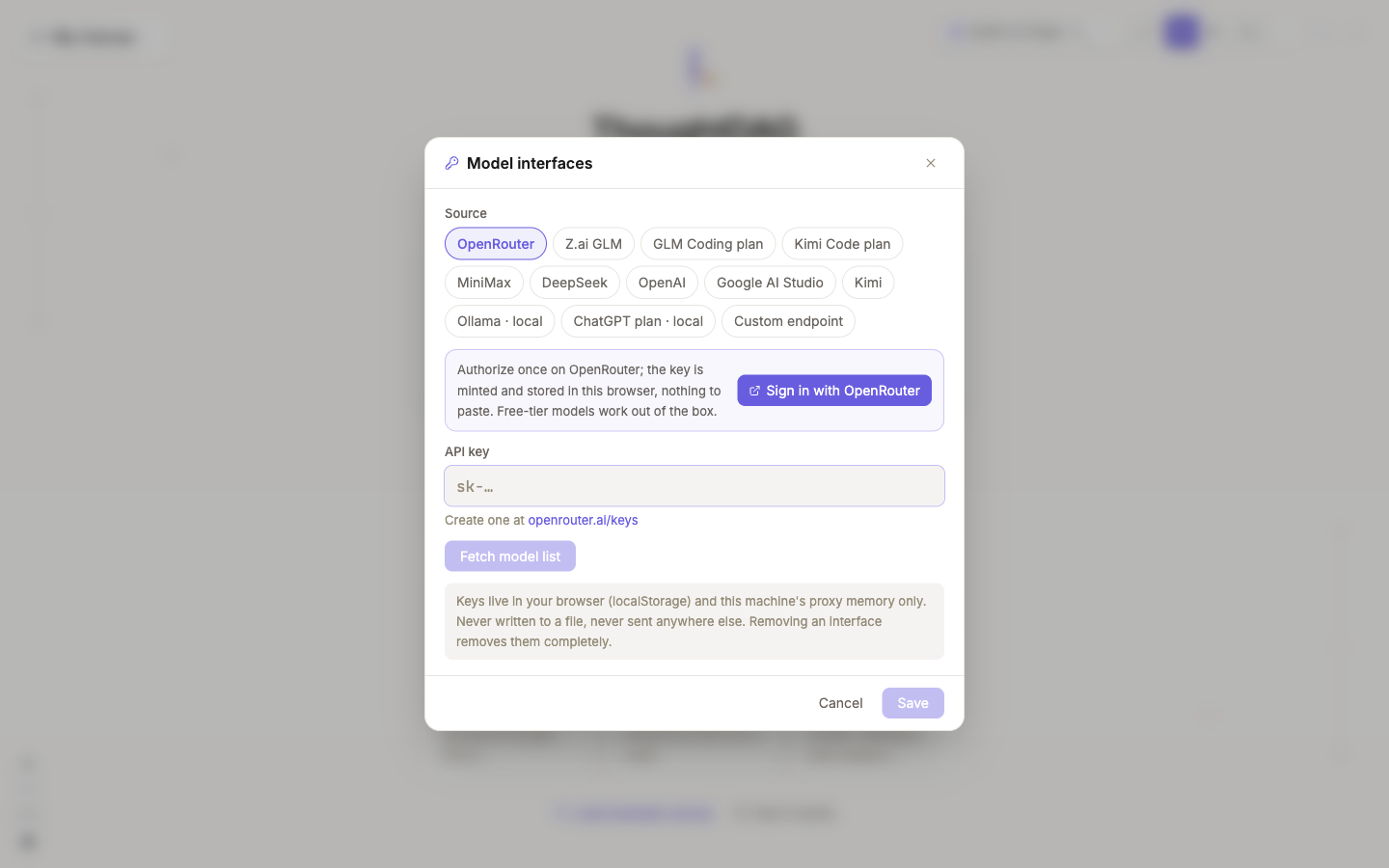
Click the model menu → Configure model APIs to open the model-access window. Click Add connection, pick a preset and paste the key; or choose Custom endpoint, enter an OpenAI-compatible base URL (one ending in /v1; a local model counts) plus any key, click Fetch models, enable the ones you want, and save.
The model menu groups into two tiers: regular generation models above, Agent execution grouped by runtime (Codex, Claude Code) below. The selection is the default for new nodes — already-generated nodes keep their own model.
You can also bring your own decision model: in the same window, switch to Fast thinking · Decision model, set the provider to Custom System One URL, paste your /v1/systemone endpoint, and Test — if you see latency and a model name, it's wired up. Without a System One endpoint you can also let one of your chat models stand in for the decision model. Multi-model branch scores and every other automated decision route through it.
2. Ask the first question
Type a question into the home page input and press Enter. The first node appears and the answer streams in; models with a reasoning phase show a collapsible "Thinking" bar above the answer.
The example question is "why do many teams write postmortems and still have the same incidents happen again?" — the default model wrote 1,461 characters in 58 seconds.
3. Follow up: context flows along the wire
Double-click a node to open its panel on the right: question and answer on top, a "Continue..." input at the bottom. Type a follow-up here and press Enter. A new node appears directly below, connected by a solid wire — the child reads the full upstream question and answer.
In the measured run, the follow-up is "If we could change only one thing, what matters most?" Its send contains 4 messages: the system additions, the first question's Q and A, and the follow-up itself. After it answers, the follow-up node's next turn becomes 6 messages and about 2,414 tokens — the two extra messages are the entire upstream turn carried through. How to inspect those numbers is §6.
4. Go sideways: open a branch
Back on the first question, double-click to open its panel and ask a different question. The new one becomes a sibling of the original follow-up.
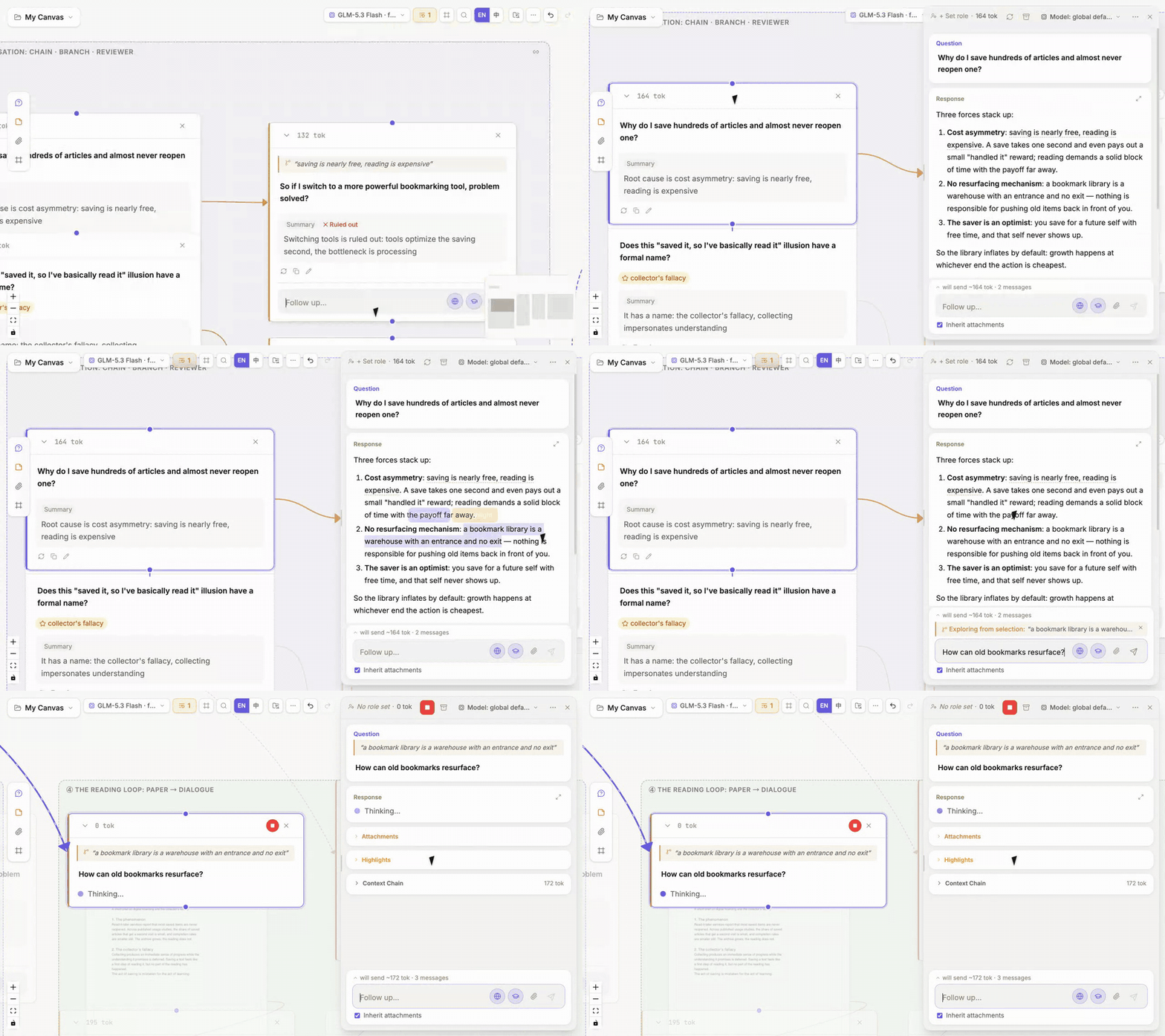
The two branches cannot see each other. In the measured run, the branch's send is again 4 messages — not a word of the sibling follow-up's wire came along. The branch's own next turn is 6 messages, still excluding the sibling.
A follow-up always hangs under the node whose panel is currently open. To fork somewhere else, open that node's panel first. The expanded card on the canvas also has its own "Continue..." input with the same effect. Selecting a passage inside an answer lets you branch on just that passage.
When the canvas gets crowded, click ⋯ → Tidy layout in the upper right. The canvas rearranges along the wire direction: same conversation chain vertically aligned, branches spread to the side. You'll be asked to confirm; Cmd+Z undoes it.
5. Have several models answer together
In the node panel's upper-right menu, choose More actions → Add perspective → Multi-model comparison:
- In "Common question" write what you want to compare.
- Pick at least two models under "Participating models".
- "Synthesize when all finish" is ticked by default; after every model answers, a synthesis node is generated.
- Click "Have N models answer".
Each model answers on its own branch without seeing the others; the model used is noted at the branch's foot. When they're all done, the synthesis node takes one wire from each branch — those wires are its entire context, nothing pre-assembled.
| Model | Answer length | Time |
|---|---|---|
glm-5.3-flash | 183 chars | 4.1 s |
kimi-k2.5 | 133 chars | 16.2 s |
deepseek-v4.1-flash | 149 chars | 9.1 s |
Synthesis (default model auto) | 1,956 chars | 75.6 s (from click) |
The synthesis writes to a fixed structure: consensus, disagreement, what each one saw that the others didn't, hypotheses still to verify, suggested next steps.
Which branch was best? Once every branch has answered, the decision model rereads all of them in the background and stamps a small tag on each card: "★ Best" on the strongest, a quality score out of 3 on the others, and "⚠ Possibly off-target" where it suspects a miss. Hover reveals the underlying numbers — probability the question was answered, distribution across the four quality bands, probability of being the best of the set.
Measured: three models on the same question all got scored, their answer probability running from 84% to 93%. An intentionally off-topic answer and an incorrect answer in a separate test scored 1% and 4%. Treat the score as advisory: the decision model can be wrong too, so it never edits or deletes anything and never enters any context — the synthesis node reads only the raw branches.
Answer again with another model. If one branch disappoints, click its double-arrow button and pick a different model. Same context, the new answer appends as a new version, the old one is kept — switch freely; the node's pinned model doesn't change. Larger tiers (max, pro) sort to the top and get a "stronger" tag. Re-answering re-scores the set. In one test the weakest branch was re-answered with glm-5.3 and moved from last to first. Agent nodes don't have this button: re-running them would re-do file edits and shell commands.
Two other modes run on the same machinery: One-shot roles has several personas (reviewer, PM) each answer once independently; Sliding reviewer keeps a persona next to the thought and re-reviews it every step.
Back to the main line. Follow-ups, branches, merges — every wire you draw is a possible thread of context. Next: what did those wires actually let the model read.
Part two: see what the model reads
6. Before sending, see the full request
Above the follow-up input in the node panel sits a line like "Will send ~1337 tok · 4 messages" — the complete next ask to the model. The system additions and your question each count as one message.
Click it and the full request expands, in the order the model reads it:
- System additions — current date, reply language, what the markers mean; with search tools enabled, a citation-rules paragraph is added too.
- Role — any role applied to this node.
- Materials, references, conversation — what the wires carry in; every turn in the follow-up chain is one message.
- Memory — long-term notes when memory is on; with recall on, a "searches at send time" row whose content resolves only at send.
- This question — what you're typing now, including any
@-mentioned nodes and freshly attached files.
Every row opens to its full text; Copy full request is at the bottom. The preview and the real send come from the same compiler and match message-for-message.
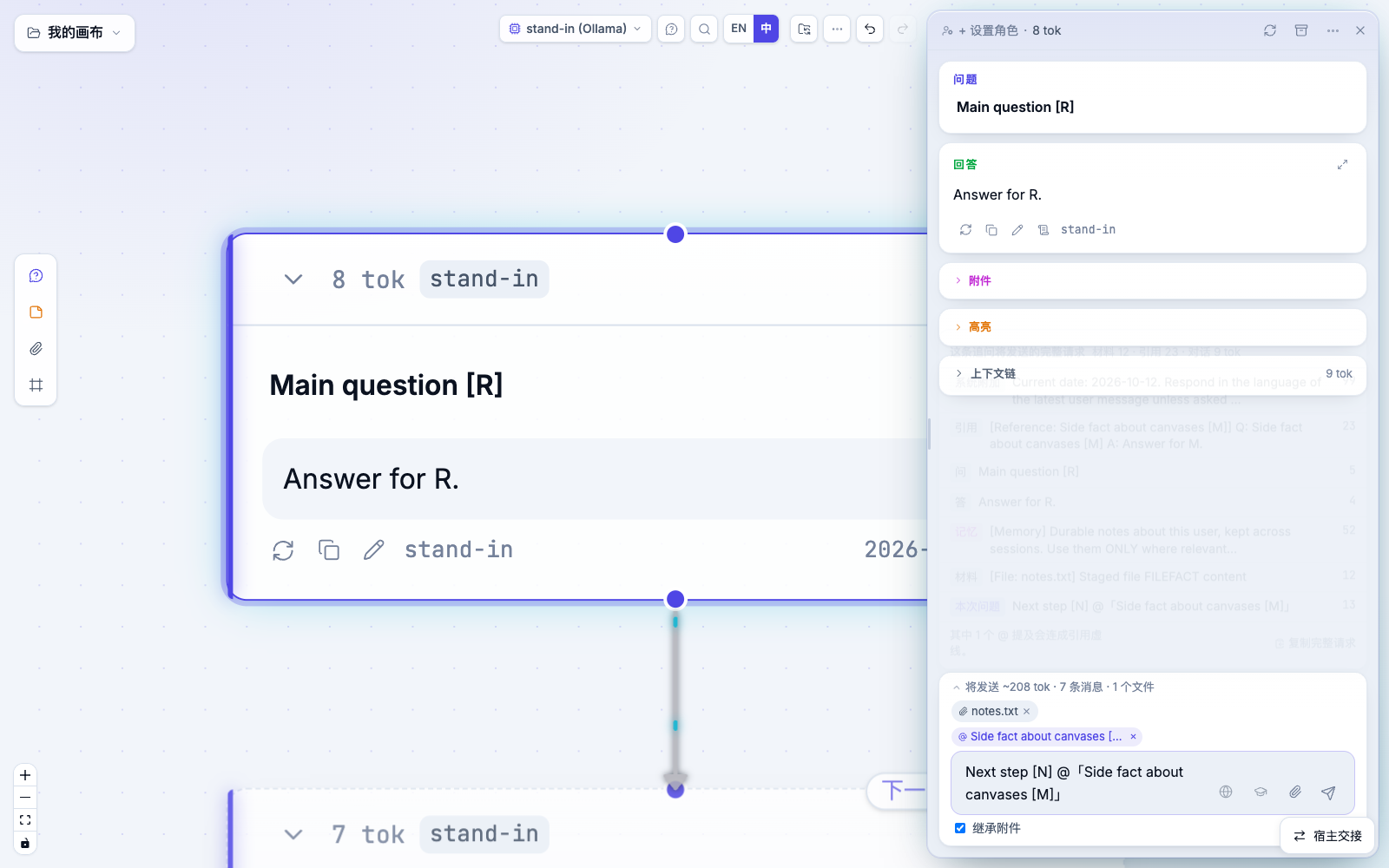
In the measured run, after the follow-up the follow-up node's next turn is 6 messages; the conversation portion is about 2,315 tokens, and both earlier turns are present:
Before paying for tokens, confirm what the model is about to see.
7. After sending, read any version's receipt
Every answer version retains the exact request it was generated from. The paper-scroll icon under an answer (tooltip "What it read") opens that request, in the same format as the pre-send preview.
If upstream changed after this version was written — say, a referenced answer was replaced — the rows that no longer match what the node would read today are marked Changed since:
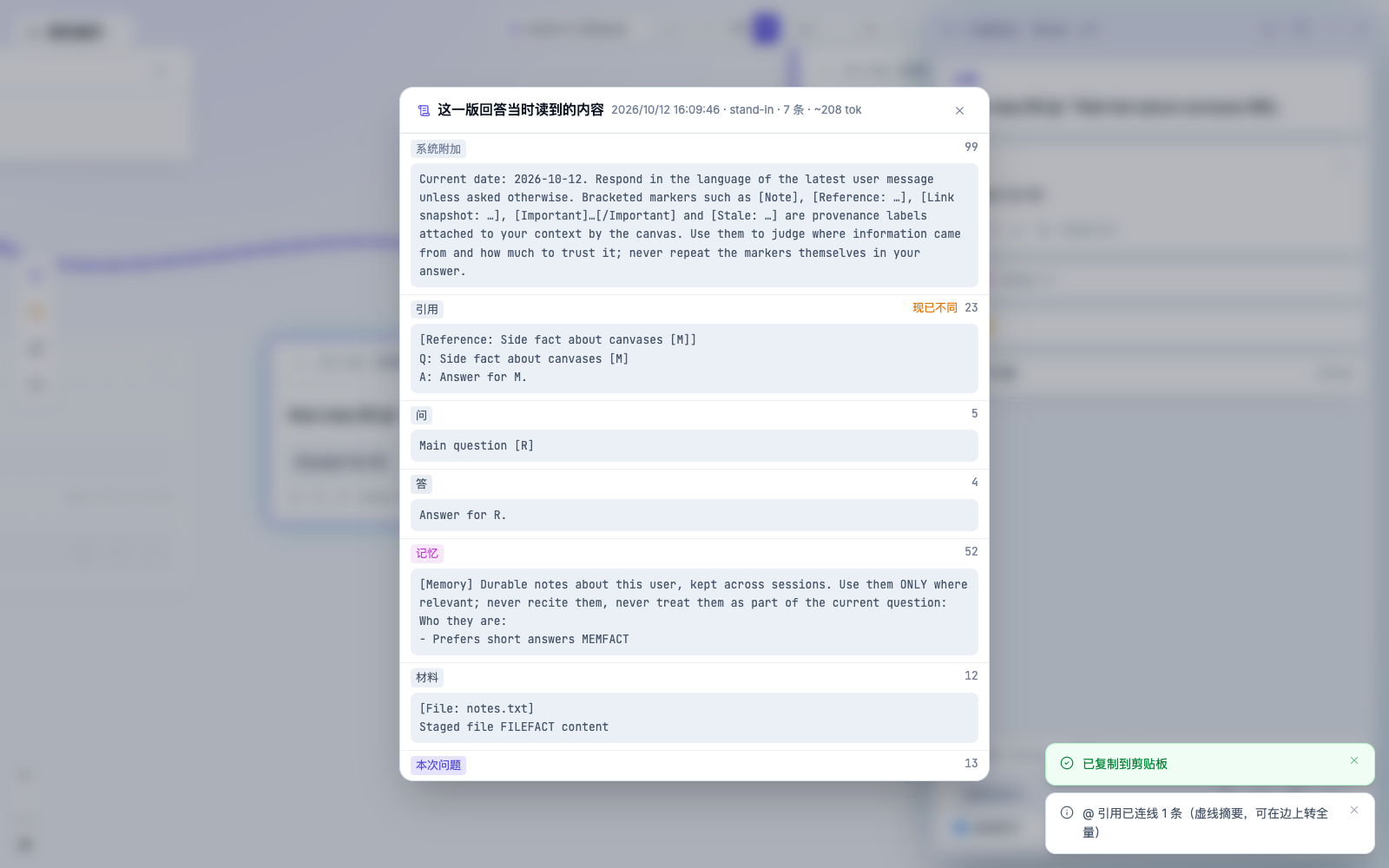
Receipts stay in this browser, deduped by content. They are not included in exports or shares. Versions generated before this feature shipped, or in another browser, have no receipt; the window will say so plainly.
8. Upstream changed, the answer says so
When a node is written, its input is fingerprinted. If an upstream question, answer, or wire later changes so the node would today read something different from what it read then, an Upstream changed marker appears on it. The marker means "this answer was written against older input" — it is not a verdict. Compare the receipt, then decide whether to rerun (see §12).
Back to the main line. Pre-send preview, post-send receipt, an explicit marker when upstream drifts. What the model reads is inspectable at every step. Next: change it.
Part three: editing context is editing wires
9. Cut a wire, lose that chunk of context
Cut: click a wire to select it, then Delete (or Backspace). In the measured run we cut the wire from the first question to the "how to measure it" branch:
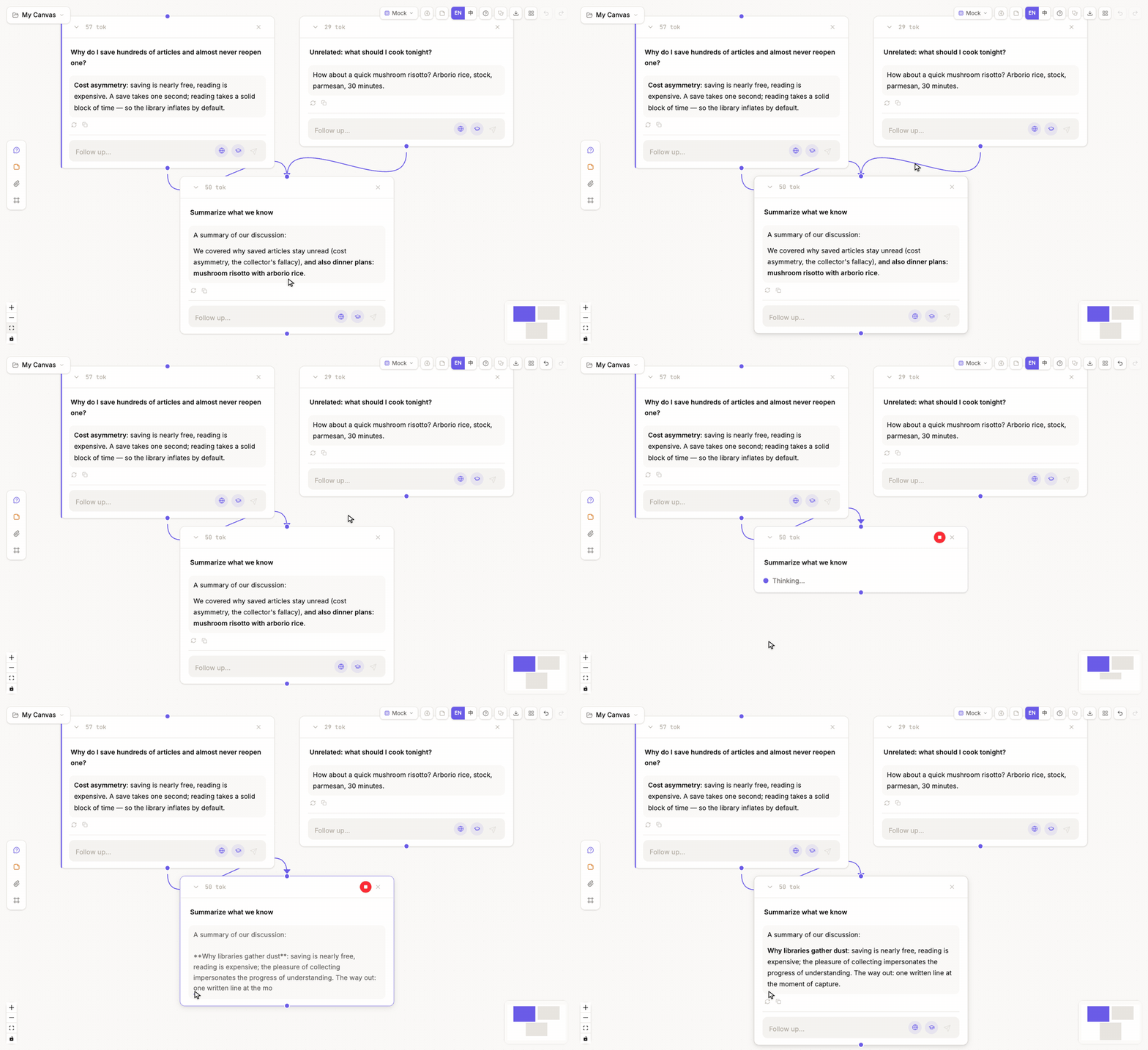
The branch card warns immediately. Open its panel and the next send drops from 6 messages / about 2,603 tokens to 4 messages / about 1,384 tokens — the first turn is out of context.
Cut the wrong one and Cmd+Z reconnects it; the wire restored cleanly in the measured run.
10. Connect, reconnect, insert a step
- Connect: drag from one node's handle to another node — two threads merge.
- Reconnect: select a wire; drag either end onto another node's handle. The wire switches; type and settings carry over. Reconnects that would form a cycle in a solid wire, point at a material or a frame, or duplicate an existing wire are refused with a reason. A wire branched from selected text is bound to that text and cannot be reconnected.
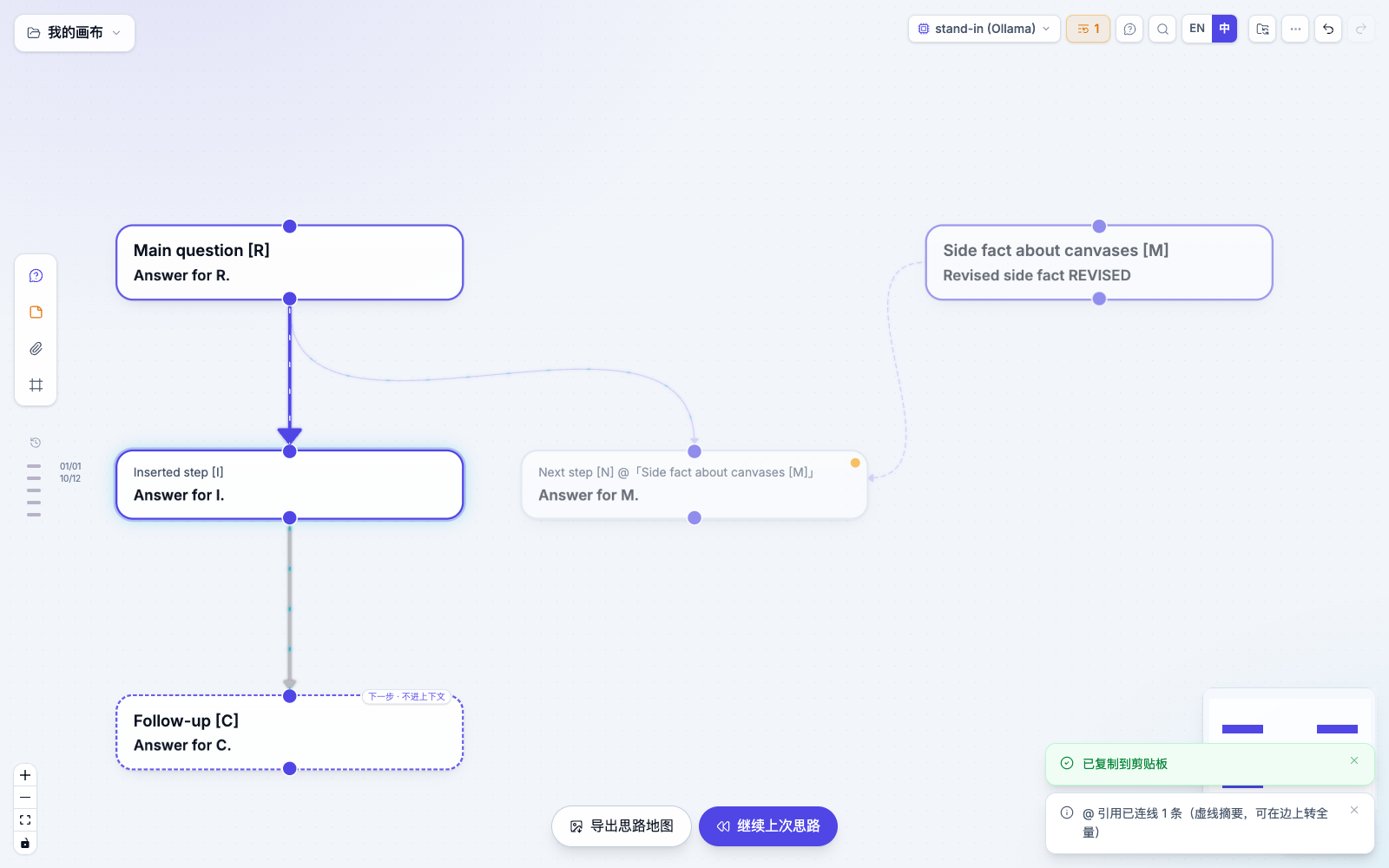
- Insert a step: right-click a solid wire, choose Insert a step here, type the question, Enter. A new node drops between the endpoints; the old downstream now hangs under the new step, still in the same column; downstream nodes are marked "Upstream changed" because they now read one more turn.
11. Materials, delete, archive
- Add a material: pasted text becomes a note, a URL becomes a web snapshot, a dropped document becomes a file node. Material only enters context when it's wired to a question; a node either says "Not wired · not in any context" or how many places it's wired into.
- Archive: the node stays on the canvas; its content leaves the context.
- Delete: deleting a node with downstream also deletes the downstream. The confirmation offers Undo, and archive this step instead: click it and everything returns, only this step archived.
12. Replay the affected nodes
After edits, an orange button with a count appears in the canvas top bar — the count is the number of nodes marked "Upstream changed". Clicking it asks what to rerun and how many tokens it should cost, then replays in dependency order. Each node appends a new version; the old answer is preserved. Nodes whose input didn't change after upstream reruns are skipped; downstream of a failed node doesn't run. You can stop mid-way.
After every wire edit, expand the "Will send" line and re-confirm what the model is about to see.
Back to the main line. Cut, connect, reconnect, insert, archive — everything is a wire edit; replay brings the answers in line with the new context. And everything can be undone.
Part four: hand it to an agent
13. Let an agent act on the canvas
In the model menu, under Agent execution → Codex, pick a configured model. If reasoning effort is available, confirm and the menu closes. A work-directory button appears on the left of the toolbar. The default is canvas workspace — every canvas gets its own directory under ~/.weft/workspaces/; you can swap it for any local directory.
Then ask as usual. The measured ask was "in the current working directory, create weft-e2e.md with a three-line postmortem action list". Codex wrote the file in 12 seconds; the node records the runtime, the working directory, and the new file.
The agent reads exactly what a regular node reads — whatever flows in along the wires. This one hung under the "what matters most" follow-up, so its action list continues that thread. Claude Code works the same way, via Agent execution → Claude Code.
The work-directory button also switches approval mode: by default, when the agent is about to do something that needs authorization, a confirmation card pops on the node and you approve or deny; switching this to allow lets the agent run without asking.
14. Open an agent session as a graph
Sessions you've had with Claude Code or Codex in a terminal can also be opened as a graph: each turn becomes a node, tool calls and results hang as attachments.
- On the home page, click Or open your agent conversations as graphs and pick a session from the list.
- Or in Claude Code type
/weft(in Codex,$weft) to open the current session. These commands are installed byweft setup skill --apply; without the server running, one is started in the background (weft stopends it).
Once opened, the canvas keeps growing with the session: every new turn lands as a new node, synced within about 1.3 seconds in the measured run. This is a mirror — pruning, branching, or following up doesn't rewrite the source.
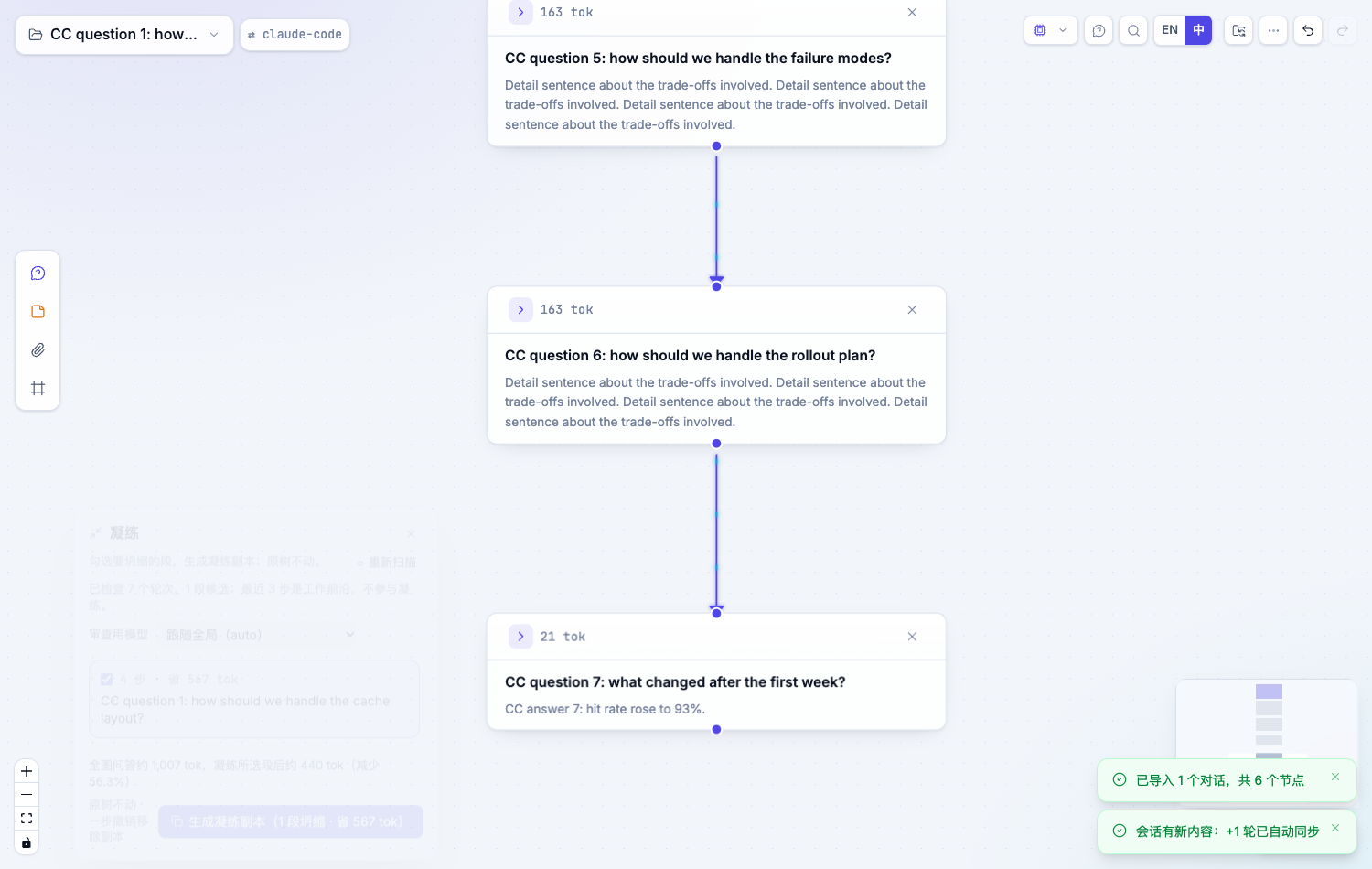
When a session gets long, the ⋯ menu Condense collapses runs into conclusions; the window reports pre/post token counts (in a measured case the whole-graph Q+A dropped from about 1,007 tokens to about 440, a 56.3% cut). The effect is much larger on long sessions. A real 141-prompt Codex session holds about 279k tokens of conversation plus about 2.81M tokens of tool outputs on the chain. Earlier turns' tool outputs stay out of context by default (the note of which files they touched remains; the last turn's own outputs still come along), so following from the chain tail is about 324k tokens — the follow-up box turns amber and suggests condensing first. The condense run found 22 runs and took 3 minutes; the copy's conversation dropped to about 95k tokens, the copy's chain-tail next ask is about 138k tokens, and about 95k with Inherit attachments off. The original is untouched. Use node scripts/measure-long-session.mjs to reproduce this measurement.
To pull a specific earlier tool output back in anyway, open the node's Attachments — they're listed under "Inherited from upstream" marked "Earlier tool output, off by default"; the button on the right brings one back for this node only. Right-click the node and Copy context for a CLI session to paste the curated context into a fresh terminal session; the new session mounts back onto this canvas as a branch. More in Session Atlas.
15. Let a terminal agent edit the canvas directly
If you're already running Claude Code or Codex in a terminal, it can edit this canvas directly — no copy-paste:
- Install the Weft Skill into your project: install the CLI as above, then in the project run
weft setup skill --apply. From a checkout you can alsonpm run host:build, thennode scripts/install-skill.mjs --project /your/project --hosts claude codex --apply. - On the canvas, click Host handoff in the lower right and tick Allow local agents to edit this canvas. A green dot appears beside the button.
- Tell the agent what to do in plain language. The measured ask was "On the postmortem canvas, branch from the root question with 'if we could change only one thing, what matters most?', wire the evidence node in as a reference, and answer it".
The agent reads the canvas, branches, wires the reference, answers, and writes the answer back to the node. New nodes auto-layout along the wire direction; every change surfaces a notification and Undo rolls it back. The panel lists recent agent requests.
Measured: Claude Code (glm-5.3) took 45 s and Codex (gpt-5.3-codex) 93 s; both were given only the one instruction above.
Several agents can edit the same canvas concurrently. Each sees only what's wired into its own node — they can't smell each other. If two submit at the same moment, the later one is told the canvas changed, rereads, then applies — nobody overwrites anybody. If one agent edits an upstream answer, downstream answers written by other agents are marked "Upstream changed". Measured with Claude Code and Codex on the same canvas, each opening a branch: 96 s and 130 s; Codex hit a conflict once, reread the canvas, finished. The canvas only accepts requests from this machine; refreshing, closing the page, or unchecking the handoff toggle cuts access.
To ask "which turns of conversation touched this file and why", use weft why <file>. See Why layer.
Back to the main line. Agent nodes, session mirrors, terminal agents — all read only what's wired in. The same rule runs from the canvas into your terminal.
Export and backup
The ⋯ menu has two export actions:
- Export backup (.json) — the full canvas; can be re-imported on another machine as-is.
- Export as linked notes (.zip) — one Markdown per node; the extracted folder opens directly as an Obsidian vault. Measured run produced 9 files (8 nodes + 1 index page).
Each note opens with metadata, writes the question as a callout, the answer as the body, and closes with [[wikilinks]] for the surrounding relationships:
---
weft_id: "node-1791735081724-1"
kind: thought
created: 2026-10-11T16:11:21.724Z
generated: 2026-10-11T16:12:14.334Z
tags: [weft]
---

> [!question]
> If we could change only one thing, what matters most? Give a concrete plan.

If we could change only one thing, it is never "how we write the doc" or "more training". …

## Continues from
- [[Why do many teams write postmortems and still have the same incidents happen again?]]

## Followed by
- [[In the current working directory, create weft-e2e.md with a three-line action list (Markdown), then reply in one sentence]]The canvas itself auto-saves into browser-local IndexedDB. Measured: refresh the page and all 8 nodes are still there. Answer receipts live in this browser and are not part of the export.
Frequently asked questions
| Symptom | Cause and fix |
|---|---|
| Model menu is empty | No model connections have been configured yet. Open model settings and click Add connection |
| Model dialog won't close with Esc | Use the Close button at the bottom right |
| Double-click doesn't open the panel | The node is out of view. Use the fit-view button at lower left or scroll it into frame, then double-click |
| A follow-up hung under the wrong node | Follow-ups always hang under the node whose panel is currently open. Open the target node first, then type |
| Receipt says "no saved request for this version" | The version was written before the receipt feature shipped, or in another browser |
| Dragging an end of a wire doesn't reconnect | Read the toast: cycles, targets on a material or frame, duplicates are refused; a wire branched from selected text cannot be reconnected |
| No Agent group in the model menu | The page isn't running through the local proxy, or neither codex nor claude is installed on this machine. The menu tells you which command wasn't found and where it looked |
| The Run button in multi-model compare is greyed out | You need at least two models selected, and the question can't be empty |
unzip renders linked-note filenames as mojibake | macOS's built-in unzip ignores the UTF-8 filename flag. Double-click the zip, or use ditto -x -k file.zip target-dir/ |
Terminal agent reports NO_SERVER or NO_CANVAS | The local proxy isn't running (former), or the canvas isn't open / Allow local agents to edit this canvas isn't ticked (latter) |
Terminal agent reports REVISION_CONFLICT | You edited the canvas after the agent last read it. Have it re-inspect and retry |
Appendix: measurements and coverage
Main flow (13 steps)
| Step | Result | Time |
|---|---|---|
| Model configured | Signed in with provider key, 12 models available | — |
| First question (default model, with thinking) | 1,461-char answer, about 1,238 tok | 58.3 s |
| Follow-up | 1,331-char answer; next send is 6 messages / about 2,414 tok | 48.2 s |
| Open another branch from the first question | Send still 4 messages (no sibling wire content) | 34.2 s |
| Cut the branch's incoming wire, then undo | Send drops from 6 to 4 messages; undo restores | — |
| Multi-model comparison: 3 models + auto-synthesis | All 3 branches answer; synthesis node has 3 incoming wires | 75.6 s (incl. synthesis) |
| Codex writes a file | weft-e2e.md created in the canvas workspace, change recorded on the node | 12.1 s |
| Export linked notes / JSON backup | 9 Markdown files, archive validated | under 1 s |
| Refresh the page | All 8 nodes persist | — |
To reproduce on your machine: start the two servers, then
node scripts/e2e-user-journey.mjs evidence/weft-user-journey-$(date -u +%Y%m%dT%H%M%SZ)The script writes screenshots, exports, and metrics.json into the given directory; a failed step leaves a fail-<step>.png.
Feature-level acceptance
| Feature | Result | Verification |
|---|---|---|
| Pre-send full request, receipts and "Changed since", reconnect, insert step, archive instead of delete (§6, §7, §10, §11) | 35/35 checks | scripts/verify-context-visible.mjs |
| Decision-model branch scoring, answer-with-another-model (§5) | 18/18 checks, both the answering model and the decision model are real hosted models | scripts/verify-node-judge.mjs |
| One-click replay (§12) | 13/13 checks | scripts/verify-replay-plan.mjs |
Sessions opened as graphs, /weft, condense (§14) | 17/17 checks | scripts/verify-local-atlas.mjs |
| Terminal agents editing the canvas directly (one each of Claude Code and Codex, §15) | Each read the Skill, branched, wired a reference, answered, wrote back; receipt stored on canvas; 45 s / 93 s | scripts/verify-real-host.mjs |
| Two terminal agents editing the same canvas simultaneously | Both finished; Codex hit one conflict, reread the canvas, completed; neither saw the other's branch in its input; 96 s / 130 s | scripts/verify-multi-agent.mjs |
The acceptance for §6, §7, §10, §11, §12, and §14 uses stand-in models and synthetic sessions — they validate UI behavior and actual outgoing requests, not answer quality. The full record is in VERIFICATION.md at the repository root.
What is not covered
The following are not covered and shouldn't be taken as verified:
- Manually connecting wires and importing materials (§10, §11): described from in-app tutorials; not part of the 13-step main flow.
- Claude Code as an Agent node on the canvas: previously run standalone; not part of the 13-step flow.
- Terminal agent directly editing the canvas: each agent ran once — no evidence about stability for other models.
- Full SSO sign-in flow: the test machine was already signed in; only the status display was exercised.
- The "one-shot roles" and "sliding reviewer" perspective modes, the reader, memory and recall, web search.
- The desktop app, the English UI, Windows, and Linux.
Per-feature details: Guide map, Control context, Models, tools, and memory.